.jpg)









Key Takeaways
- What is Windows MDM? Mobile Device Management for Windows enables the centralised management of all company devices – from automatic configuration and security policies to patch management and remote capabilities.
- Security risks from manual management: Missing patches, uncontrolled software installations, and outdated operating systems are real entry points for cyberattacks – especially critical for SMBs without a dedicated IT department.
- Cloud-based device management is the more practical choice for SMBs: No dedicated server required, full remote capability, and usable without technical expertise.
- deeploi goes beyond traditional MDM. As an all-in-one IT platform, deeploi combines Windows device management with automated onboarding, IT support, and cybersecurity – no technical expertise required.
Why Windows device management matters for SMBs
Mobile Device Management (MDM) for Windows means centrally configuring, securing, and managing all company devices. Without a structured approach to device management, concrete risks emerge: security updates get missed, employees install software without oversight, and if a laptop is lost or stolen, there's no way to remotely lock or wipe it.
What might seem like organisational chaos at first glance is actually a structural risk. Without a defined process for managing Windows 11 devices – or older systems – there's no foundation for endpoint security, GDPR-compliant device management, or a clean device lifecycle. The consequences range from productivity losses to serious compliance violations.
Risks of outdated Windows device management in SMBs
Anyone looking to secure Windows endpoints needs to understand the specific threats involved. Without centralised patch management and clear security policies, vulnerabilities emerge that attackers actively exploit.
Outdated operating systems: Official Windows 10 support ended in October 2025. In the European Economic Area, Microsoft extended free protection through the ESU programme until October 2026 – but after that, unpatched devices will permanently stop receiving security updates and become open doors for cyberattacks.
Missing patches: Failing to update regularly leaves gaps that attackers deliberately target. Known vulnerabilities are often actively exploited within hours of being disclosed, long before many organisations have a chance to respond.
GDPR risks: Without centralised device management, there are no logs for data access or deletion processes. If you can't demonstrate which data resides on which device, you have a serious compliance problem.
No offboarding process: Lost or unwiped devices leave sensitive company data in the hands of former employees. Without remote lock and wipe capabilities, there's no way to protect that data remotely.
{{cta}}
Windows Device Manager vs. MDM solution: what's the difference?
The Windows Device Manager is often confused with a proper MDM solution – but they solve entirely different problems.
The Windows Device Manager is opened via devmgmt.msc or the Control Panel. It shows you all the hardware on a single PC: graphics card, network adapter, USB controller, and more. Yellow exclamation marks indicate problems – such as unrecognised devices or faulty drivers. You can update, disable, or roll back drivers here.
An MDM solution takes a completely different approach: it enables centralised configuration, monitoring, and security management of all Windows devices from a single interface – fully location-independent.
If you need to resolve a driver issue on one machine, the Device Manager is the right tool. But if you want to centrally manage, secure, and automatically provision multiple Windows devices, you need a professional MDM solution.
Core MDM features for Windows: what SMBs actually need
Not every business needs a complex enterprise setup. But even small teams benefit from structured device configuration, solid endpoint security, and reliable compliance management. The following seven core features cover everything an SMB genuinely needs for complete, professional Windows device management.
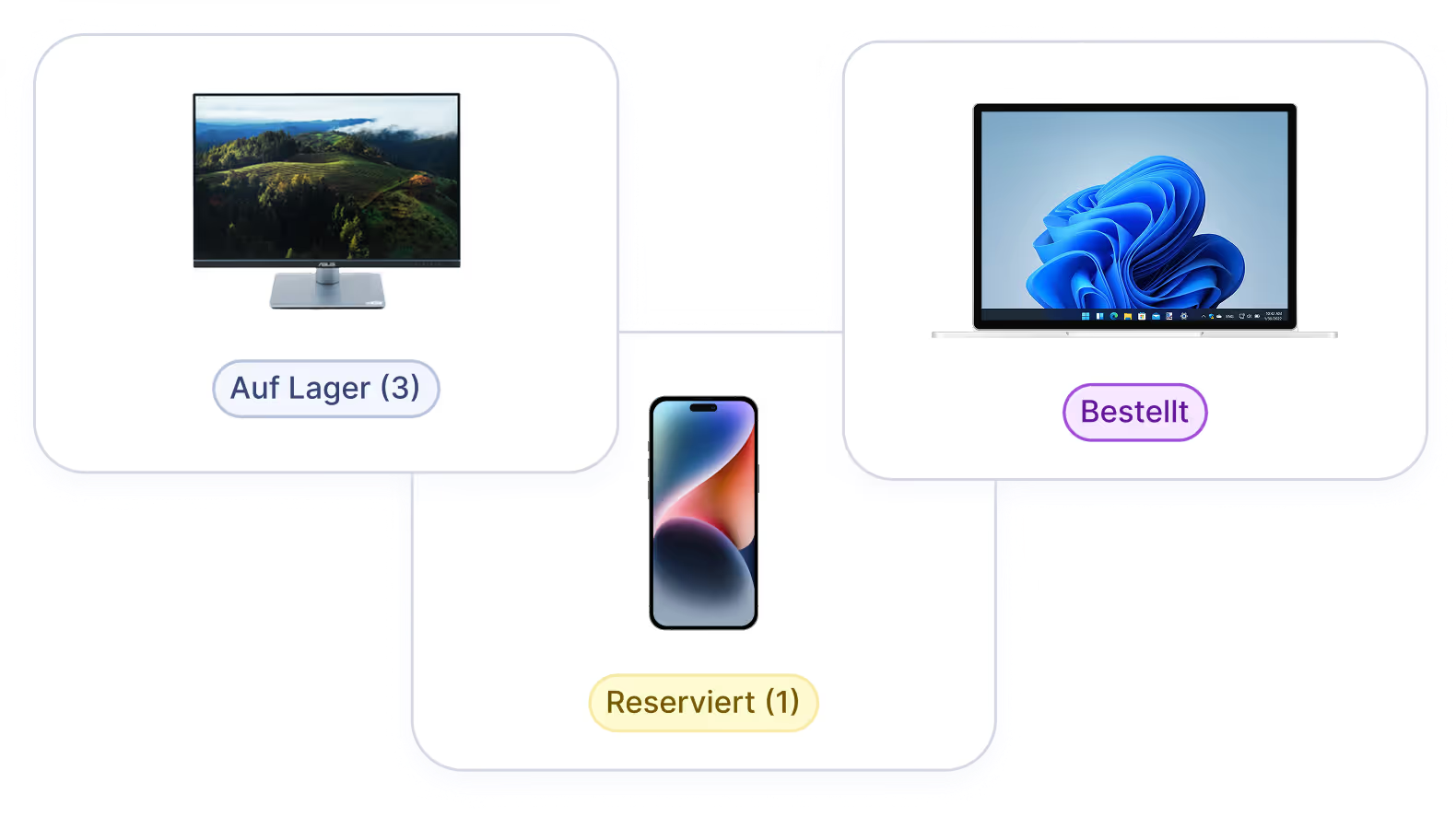
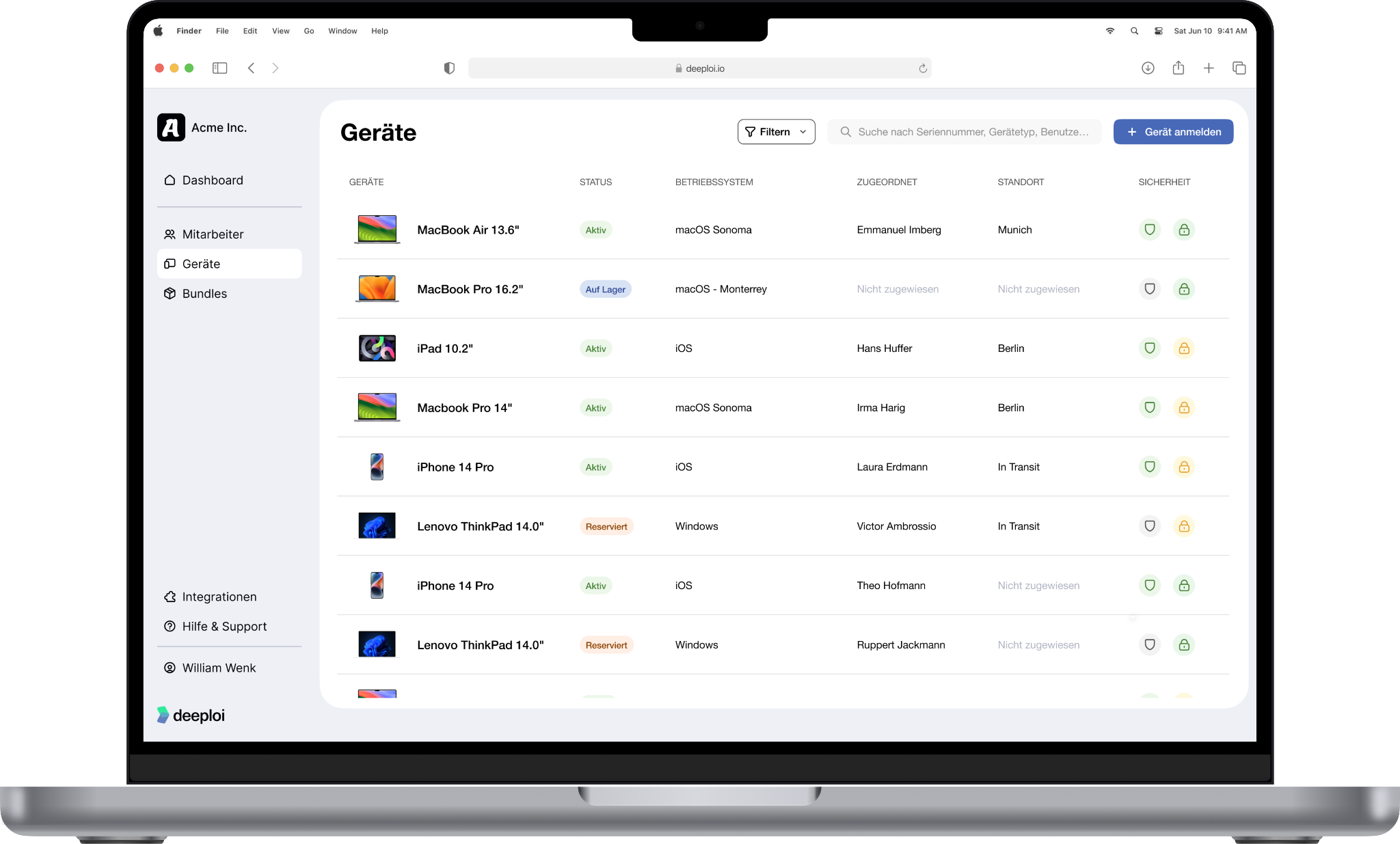
- Inventory & device status: See at a glance which device is assigned to whom, which OS version is running, and whether security policies are being followed.
- Zero-touch provisioning: A new team member receives their laptop and is up and running within minutes – no IT intervention, no manual configuration, no waiting for an admin.
- Software deployment: New software is rolled out centrally and automatically lands on all relevant devices.
- Automatic patch management: Security updates are applied without any action from your team. Outdated and unpatched Windows devices become a thing of the past – closing vulnerabilities before attackers can exploit them.
- Device encryption (BitLocker): Sensitive data on company laptops is automatically encrypted. If a device is lost or stolen, company data remains protected and GDPR-compliant.
- Compliance & security policies: Password rules, firewall requirements, and access controls via Conditional Access are automatically enforced across the entire organisation – no manual reconfiguration, no exceptions.
- Remote lock & wipe: An employee leaves the company or loses their device? Lock it or wipe it completely via remote access. Company data stays protected without anyone needing to physically handle the device.

On-premise vs. cloud MDM: what's right for your business?
The seven features above form the foundation of a modern MDM solution. But how you implement them depends largely on whether you opt for a traditional on-premise infrastructure or a cloud-based approach to device management.
- On-premise solutions such as Group Policy (GPO) or SCCM require a local domain controller, in-house expertise, and ongoing maintenance.
- Cloud MDM solutions like deeploi, on the other hand, work without dedicated servers and natively support remote work.
For businesses without their own IT department, cloud-based device management like deeploi is by far the more practical choice: no local server required, full remote access, and ready to go from day one.
Fully automated Windows device management with deeploi
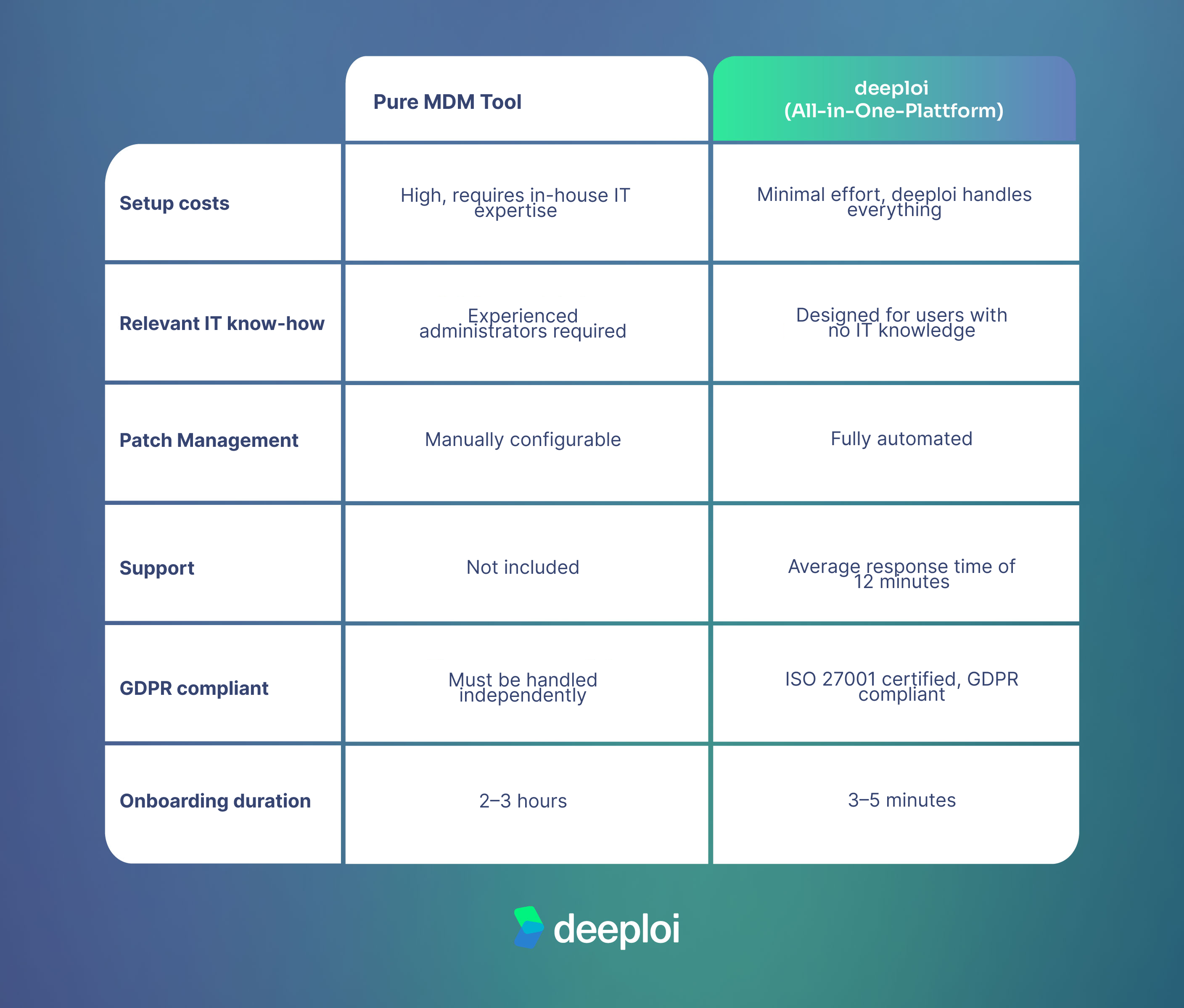
A standalone MDM tool provides the technical foundation for cloud-based device management – but it still requires in-house IT expertise for setup, configuration, and ongoing maintenance. A fully managed solution like deeploi goes a decisive step further: it combines MDM technology with automated processes and human support, enabling even businesses without an IT department to manage their Windows devices professionally.
Rather than configuring individual MDM tools yourself, deeploi takes over the complete Windows device management stack as an all-in-one solution:
- The platform covers the entire device lifecycle – from hardware procurement and zero-touch provisioning to automatic patch management, remote lock, and wipe
- On- and offboarding completes in 3–5 minutes instead of 2–3 hours
- IT support responds in an average of 12 minutes (SLA: 30 minutes), available in both German and English
- Security updates are distributed automatically, compliance policies are enforced centrally, and software deployment is managed across all Windows devices
- The platform is ISO 27001-certified and GDPR-compliant
- HR systems such as Personio or HiBob integrate seamlessly
- Software licence management for Microsoft 365 runs directly through deeploi
- New devices are automatically added to the device inventory as soon as employees complete setup
And for businesses running both Windows and Apple devices: deeploi manages both ecosystems from a single platform.
The result: up to 95% less IT overhead – particularly valuable for anyone managing IT on the side, without being an IT expert themselves.
{{cta}}
Who benefits from Windows MDM with deeploi?
Whether you're building your first team or already running up against the limits of your current IT setup, deeploi adapts to your situation. Three typical starting points illustrate where the platform makes the biggest difference.
SMBs without an IT department: When HR or the office manager is responsible for device management, manual processes quickly become a security risk. Missing patches, forgotten offboardings, and unclear device assignments open the door to attackers. deeploi handles everything – fully and automatically – so you can focus on your core business.
Growing companies: With every new team member, IT overhead grows – unless you're using deeploi. The platform scales with you without tying up additional resources. With over 3,000 supported onboardings and 17,000+ managed users, IT automation stays stable and reliable even during rapid growth.
MSP switchers: Businesses looking to move on from a traditional MSP contract will find greater transparency, predictable costs, and modern IT automation with deeploi. Savings of up to 75% compared to traditional Managed Service Providers are achievable – without sacrificing the quality a good IT partner should deliver.
RECUP, Germany's largest reusable deposit system, halved its IT support workload with deeploi through automated software rollouts, intelligent access management, and outsourced second-level support.
{{quote}}
Conclusion: the right Windows device management for your business
Managing Windows devices professionally requires more than just a tool. Manual processes, fragmented solutions, and unpatched devices aren't a minor inconvenience – they cost time, create security vulnerabilities, and slow growth. Modern Windows device management works differently: centrally controlled, automated, and without hidden overhead.
deeploi brings MDM, patch management, security policies, and IT support together in a single platform – handling ongoing operations so your team doesn't have to. Over 200 companies across the DACH region already rely on it. Book a demo now and see what smooth Windows device management looks like.
FAQ
What's the difference between the Windows Device Manager and MDM?
The Device Manager (devmgmt.msc) is a local Windows tool for managing hardware and drivers on a single PC. A dedicated MDM tool like Microsoft Intune, by contrast, manages all company devices centrally – with patch management, compliance policies, and remote capabilities such as remote lock and wipe. deeploi goes even further: as an all-in-one IT platform, it combines centralised device management with automated onboarding, IT support, and cybersecurity.
Can I manage Windows devices professionally without an IT department?
Yes. IT-as-a-service platforms like deeploi combine MDM technology with human support. Even businesses without in-house IT can run professional, automated Windows device management – including zero-touch provisioning, automatic patch management, and GDPR-compliant device configuration.
What happens to device data when an employee is offboarded?
With centralised device management, the device is wiped remotely and all access is automatically revoked. Important company data can be backed up to the cloud beforehand – such as Microsoft 365 or Google Workspace – before the device is reset. With deeploi, this entire process takes just a few minutes: data backup, access removal, and device reset, all without manual effort and without the risk of sensitive data remaining on the device.
How long does it take to set up Windows device management with deeploi?
Implementation takes between two and three weeks depending on company size and complexity. After that, new devices are provisioned via zero-touch in 3–5 minutes: employees visit start.deeploi.io, complete the setup, and the device is automatically registered in the device inventory and ready to use.