








Key Takeaways
- Five tools compared: deeploi (managed platform), NinjaOne, Atera (RMM), Lansweeper (IT asset management), and ManageEngine (IT management suite).
- When IT reporting becomes relevant: At around 20-30 employees, before an audit, or after a security incident.
- Reporting tool vs. managed platform: The right choice depends on whether someone on your team can actively set up and maintain the tool – or not.
- SMBs without an IT team: A managed platform like deeploi is the more practical choice in most cases, as classic reporting tools require IT expertise to operate.
The 5 Best IT Reporting Tools in 2026
Who in your company actually knows which laptops are assigned to which employees, which software licenses are running unused, and whether the last person who left truly had all their access revoked? In fast-growing SMBs, this visibility tends to disappear gradually – somewhere between HR tools, spreadsheets, and improvised onboarding processes. This comparison breaks down five of the best IT reporting tools, weighs their strengths and weaknesses, and clarifies when a standalone IT reporting tool is enough versus when a managed platform like deeploi is the better answer.
What is IT reporting?
IT reporting means the structured collection and presentation of IT data:
- Which devices are active in the company?
- Which software is running on which systems? Are all patches applied?
- Who has access to which data – and has that person already left the company?
Unlike IT monitoring, which tracks real-time status and triggers alerts when something goes wrong, IT reporting analyzes that data over time. It turns raw information into dashboards, trends, and audit-ready documentation. Monitoring shows you what is happening right now; reporting makes it measurable and provable.
When does a company need an IT reporting tool?
IT reporting typically becomes urgent in three situations:
- When the company grows: From around 20–30 employees, oversight of devices, software licenses, and access rights starts slipping through the cracks – often before anyone notices.
- When an audit is coming: ISO 27001 and GDPR require traceable documentation. Without structured reporting, that becomes a manual ordeal.
- When something goes wrong: A lost device, a former employee with still-active accounts, or a security incident suddenly makes visible what was previously hidden.
If nobody on your team can immediately answer which devices are in circulation and who has access to what – the answer is yes, you need IT reporting.
Selection criteria for IT reporting tools in SMB environments
A good IT reporting tool for SMBs comes down to five factors:
- Clean data integration with MDM and HR systems: Device and user data must flow together automatically, ideally pulling directly from the HR system and device management platform.
- Real-time dashboards: A reporting setup that only refreshes overnight is barely usable for day-to-day decisions. Patch status, device health, and security incidents need to be visible immediately.
- Compliance reporting: A good tool documents the state of the IT infrastructure continuously, so reports are available at the push of a button.
- Role-based access control: Not everyone in the company needs the same view of IT. Good tools let you differentiate access and visibility by role.
- GDPR-compliant EU hosting: IT reporting tools process personal data. That means a data processing agreement under Art. 28 GDPR is required, and EU hosting is strongly recommended.
The table below shows what actually matters in day-to-day SMB operations and where selection decisions typically go wrong.
The most common mistake: more connectors do not mean better reporting. What matters are clean, maintained data sources – otherwise you are just scaling the chaos.
The 5 best IT reporting tools in 2026: a direct comparison
The five tools below cover the full range SMBs in the DACH region encounter today – from a managed IT platform and classic RMM to AI-assisted endpoint reporting and specialized solutions for asset management and IT helpdesk.
deeploi: IT transparency as a platform, not a reporting tool
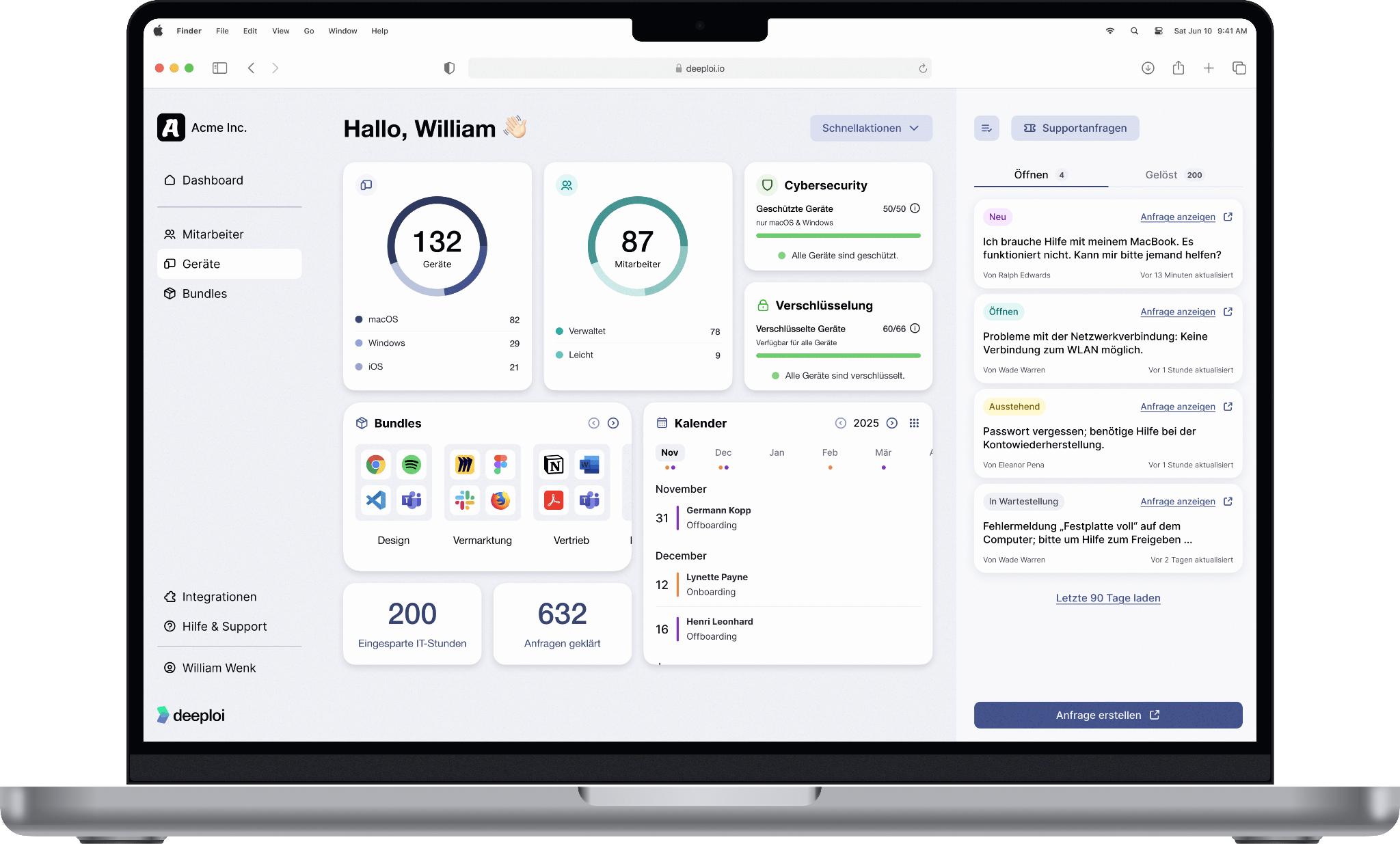
deeploi offers significantly more than a reporting tool. It is a fully managed IT platform built specifically to take the IT burden off SMBs in the DACH region. Device inventory, software status, user assignments, and patch levels are documented continuously and are always audit-ready. The platform is ISO 27001-certified, GDPR compliant, and is used by over 200 companies across the DACH region.
Strengths:
- Device and user data sync automatically; no manual reconciliation between HR system and inventory
- Real-time status of all devices at a glance, including patch levels and software state
- Role-based access control: every person gets exactly the software and access their role requires
- No separate reporting tool required
- Expert helpdesk included, with an average 12-minute response time (SLA: 30 minutes), in English and German
- Zero-touch deployment: device setup time reduced from 2–3 hours to just 3–5 minutes per person
- ISO 27001-certified and GDPR compliant, EU data hosting
- Transparent pricing, no hidden costs or add-ons
Limitations:
- Focused primarily on SMBs in the DACH region, which may limit suitability for companies operating outside the EU
Ideal for: SMBs and startups with 30–300+ employees, accidental IT owners, and companies switching away from MSPs who want fast, managed IT automation without building an internal IT team.
NinjaOne: unified endpoint reporting for IT teams
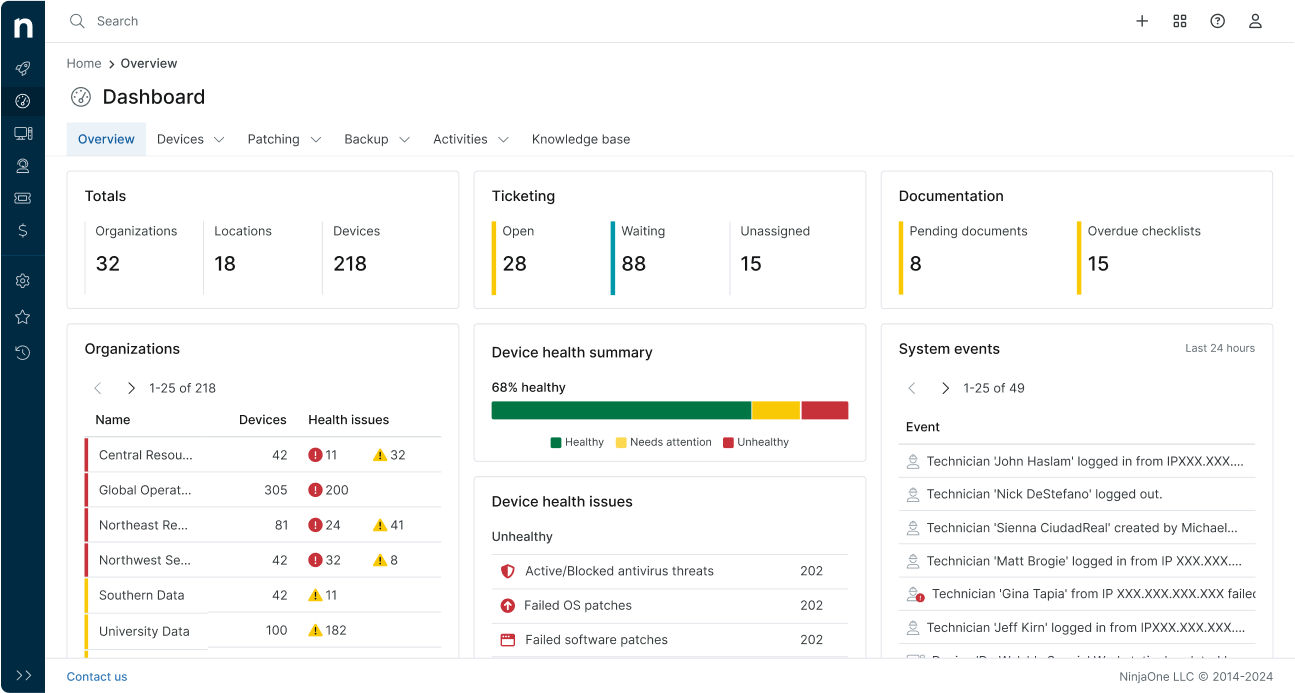
NinjaOne is a cloud-based RMM (Remote Monitoring and Management) platform that brings together endpoint monitoring, patch management, backup, and ticketing in a single console. The ITAM module (introduced in February 2026) extends classic RMM with asset lifecycle tracking, warranty management, and license management.
Strengths:
- Endpoint dashboard with real-time status on patch levels, software, and device health
- ITAM module combines endpoint data, asset lifecycle, and license management in one view
- Customizable compliance reports and templates for recurring audit needs
- Zero-touch device provisioning and cross-platform patching (Windows, macOS, Linux, mobile)
Limitations:
- Reports for leadership or compliance purposes have limited customization options
- Setup and analysis require basic IT knowledge – can be complex for accidental IT owners without a technical background
Ideal for: IT teams of one to three people and MSPs with multi-tenant requirements. Usually too complex for SMBs without any dedicated IT staff.
Atera: AI-assisted reporting for SMBs and MSPs
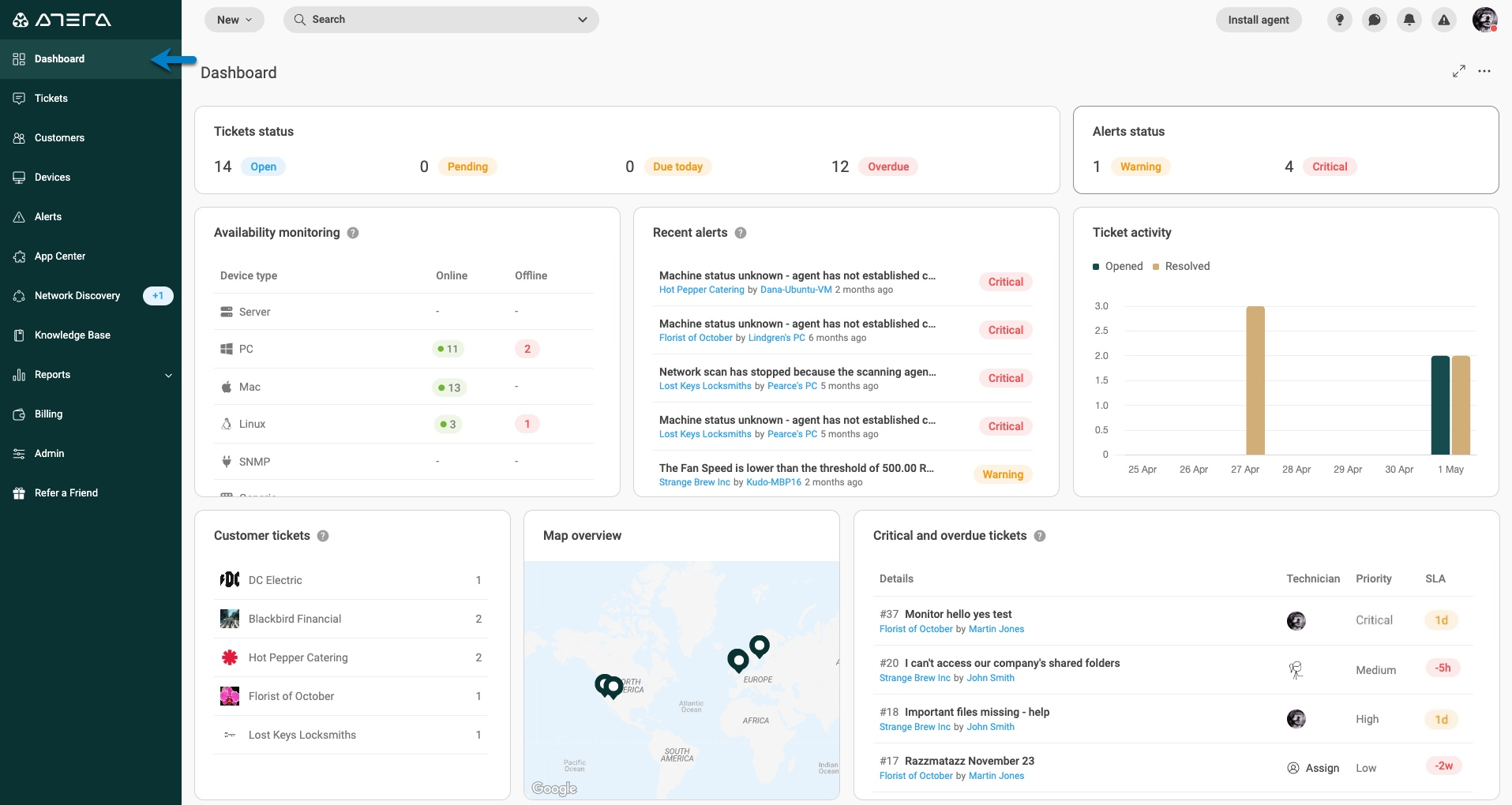
Atera is an IT management platform for MSPs and internal IT teams, combining RMM, PSA (Professional Services Automation), helpdesk, patch management, and AI-driven automation in a single per-technician subscription.
Strengths:
- AI-assisted reporting on patch status, system health, and support performance – with minimal manual effort
- Unlimited device count per technician license
- Integrated RMM, PSA, helpdesk, and patch management
- Multi-tenancy for MSPs who need to report and bill across multiple clients from one console
Limitations:
- AI Copilot is a paid add-on
- Support is primarily in English
- Limited customization for complex organizational structures or highly individual processes
Ideal for: Small to mid-sized IT teams (one to 50 technicians) and MSPs managing large device fleets who need IT reporting without per-device cost scaling.
Lansweeper: IT asset reporting built on inventory
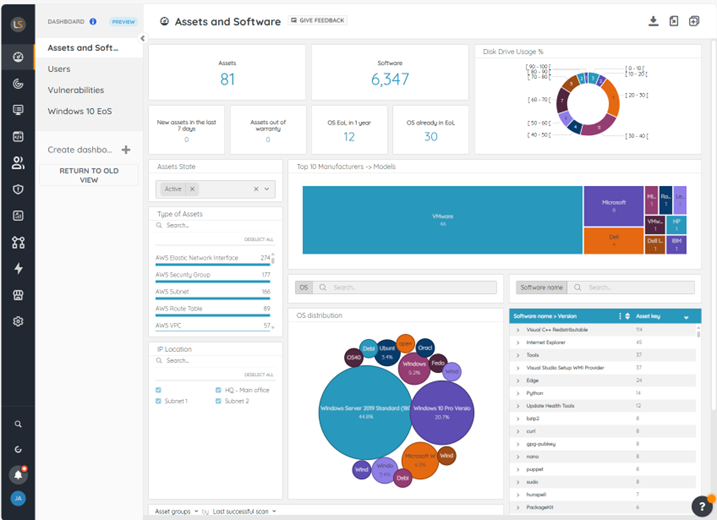
Lansweeper is a specialized IT Asset Management platform that automatically discovers devices, software, and users across your network and consolidates them in a central inventory. Reports on patch status, software licenses, hardware configurations, and vulnerabilities can be pulled from a prebuilt report library or customized as needed.
Strengths:
- Automatic asset discovery including shadow IT, inactive devices, and briefly connected endpoints
- Prebuilt report library covering vulnerabilities, licenses, and network inventory
- Customizable reports via SQL queries for specific audit requirements
- Free entry tier for up to 100 assets; integrates with Active Directory and SCCM
Limitations:
- No integrated IT support or helpdesk – purely a reporting and inventory solution
- Pricing scales with asset count and becomes expensive as environments grow
- Setup and custom report configuration require IT knowledge
Ideal for: Companies with at least one dedicated IT person who needs a complete, automated overview of their device and software landscape. Generally too complex for accidental IT owners without technical experience.
ManageEngine: IT reporting with helpdesk integration
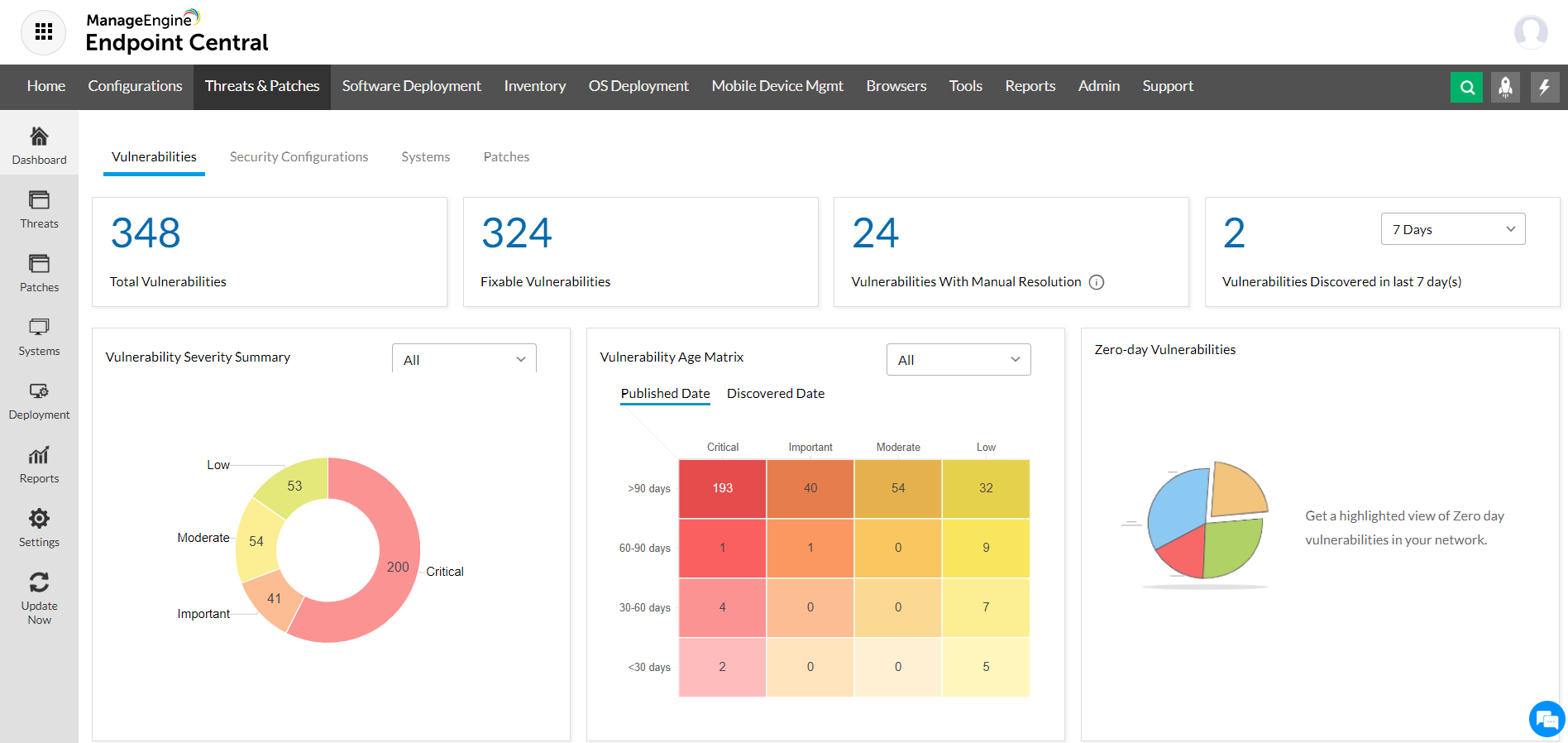
ManageEngine offers a suite of IT management modules – from MDM (Mobile Device Management) and patch management to an integrated helpdesk (ServiceDesk Plus). Reporting capabilities cover device status, software inventory, ticket analytics, and compliance documentation.
Strengths:
- Unified reporting across devices, software inventory, and support processes in one tool
- Compliance documentation for GDPR and ISO 27001 via integrated modules
- Lower entry-level pricing compared to enterprise platforms like ServiceNow
- GDPR compliant; local German-language support available
Limitations:
- The breadth of modules can be overwhelming; without clear prioritization, it is easy to lose track
- Setup and ongoing maintenance require IT experience
- Generally too demanding for teams without a dedicated IT admin
Ideal for: Mid-sized companies with a small IT team (one to three people) who want IT reporting, device management, and a helpdesk from a single provider.
Reporting tool or managed IT platform: which path fits your SMB?
The real question for SMBs is not which tool has the most features – it is how much IT self-management your company can realistically take on. The right choice depends less on the tool and more on your organization's IT maturity.
No internal IT team: A managed platform like deeploi is the more practical choice. Inventory, patches, access control, and support are fully handled without anyone internally needing to operate or maintain a tool.
1–2 IT staff: NinjaOne or Atera for classic RMM reporting and endpoint monitoring. deeploi additionally reduces the workload on standard processes like onboarding, offboarding, and inventory management.
Small IT team with an inventory focus: Lansweeper delivers a complete, automated overview of devices, software licenses, and vulnerabilities – but requires at least one experienced IT person for setup.
IT department with helpdesk needs: ManageEngine combines device reporting, ticket analytics, and compliance documentation in one suite, making it suitable for teams that want to centralize multiple IT disciplines. The setup effort is higher than deeploi. Companies that prefer to fully outsource IT are better served by a managed platform.
{{cta}}
Conclusion: finding the right IT reporting solution
A reporting tool only shows what the underlying data can support. Managing devices in a spreadsheet and assigning access manually means every additional dashboard just gives you a clearer view of the disorder. The most common mistake in tool selection is asking for the right tool too early – and asking about the right processes too late.
NinjaOne and Atera work well when someone on your team actively configures and monitors the platform. Lansweeper delivers solid inventory visibility and is a good fit for making shadow IT and forgotten devices visible – but also requires technical know-how. ManageEngine covers devices, helpdesk, and compliance documentation in one suite, though it demands the highest setup effort of the five tools compared here.
An SMB or startup without a dedicated IT team, and no appetite for enterprise complexity? deeploi automates IT processes from end to end: devices are provisioned via zero-touch, onboarding and offboarding run in 3–5 minutes, access rights are assigned by role, and security policies are enforced automatically. Compliance requirements like ISO 27001 and GDPR are met continuously, because devices, access rights, and policies are always documented and audit-ready. And the deeploi expert team is active in the background – ready to step in when it counts.
All of this without dashboard maintenance, manual effort, or last-minute patches on a Friday afternoon.
FAQ
What is the difference between IT reporting and IT monitoring?
Monitoring tracks the real-time status of devices, services, and networks and triggers alerts when something deviates from expected behavior. Reporting analyzes that data over time and turns it into dashboards, trends, and audit evidence. Monitoring gives you the raw picture; reporting makes it measurable and defensible.
Which IT reporting tool fits a 50-person SMB?
Without dedicated IT staff, a managed platform like deeploi is usually the better choice over a tool that requires active maintenance. deeploi takes over device management, inventory, and standard IT processes completely – so HR, office management, or leadership does not need to operate a reporting tool themselves. The result: full visibility into your IT infrastructure, with no added workload. Learn more
What GDPR requirements apply to IT reporting tools?
IT reporting tools process personal data and therefore fall under Art. 30 GDPR (records of processing activities) and Art. 32 GDPR (security of processing). In practice, that means documented purposes, access controls, encryption, and traceable logging. EU hosting is a key selection criterion – especially when tools capture user activity and need to be configured accordingly.
Can I implement IT reporting without an internal IT team?
Yes, but not with a classic reporting tool. Most tools in this comparison assume that someone will set them up, maintain them, and analyze the output. If you cannot provide that internally, a dashboard will not give you better visibility – just a clearer picture of the gaps. That is exactly where deeploi comes in: the platform manages device inventory, access control, and compliance documentation as a fully managed service, is up and running within a few days to three weeks, and then runs automatically in the background.