








Key Takeaways
Monday morning, 9 a.m.: Your new employee sits in front of their laptop, ready to get started. Instead of being productive, they are staring at error messages. Outlook is not working, essential software is missing, and the system is unstable because critical updates were never installed. You spend the next two hours desperately looking for solutions to help your new team member instead of focusing on your actual tasks. Situations like this are frustrating and waste valuable time. The solution? Professional patch management that ensures all devices stay up to date automatically, without you having to worry about it.
The topic at a glance
- Closing security gaps: Patches fix software vulnerabilities in operating systems and applications before cybercriminals can exploit them. In 2023, more than 29,000 new vulnerabilities were reported – unpatched systems are the biggest entry point for cyberattacks.
- Massive time savings through automation: Manual patching can take IT teams several hours per device. Automated patch management solutions significantly reduce effort and eliminate human error.
- Companies without an IT department are especially at risk: Without dedicated IT resources or expertise, updates are often delayed or overlooked. This significantly increases security risks and compliance violations.
- deeploi automates the entire patch management process: At deeploi, we take care of all relevant patches on your devices and provide a central overview of patch status. Our support responds in an average of 12 minutes.
Why patch management is critical for businesses
Patch management is not a technical nice to have. It is business critical for every company. Unpatched systems are the biggest entry point for cyberattacks. Most successful attacks exploit known vulnerabilities for which patches have long been available. Without structured patch management, you risk data loss, system outages, and serious financial and legal consequences.
The three most important reasons for professional patch management:
- Cybersecurity: Security patches close critical vulnerabilities before attackers can exploit them for ransomware, malware, or data theft. Every day without a patch increases your risk exponentially.
- Compliance: Missing patches can lead to compliance violations, resulting in significant fines and reputational damage.
- Productivity: Outdated software causes system instability, crashes, and compatibility issues. Regular patching ensures stable systems and minimizes unplanned downtime that prevents your team from working.
The challenge: Manual vulnerability management is time consuming, requires IT expertise, and does not scale as companies grow. Modern patch management solutions address these pain points through automation, centralized management, and proactive monitoring, without requiring you to be an IT expert.
The patch management process – how it works properly
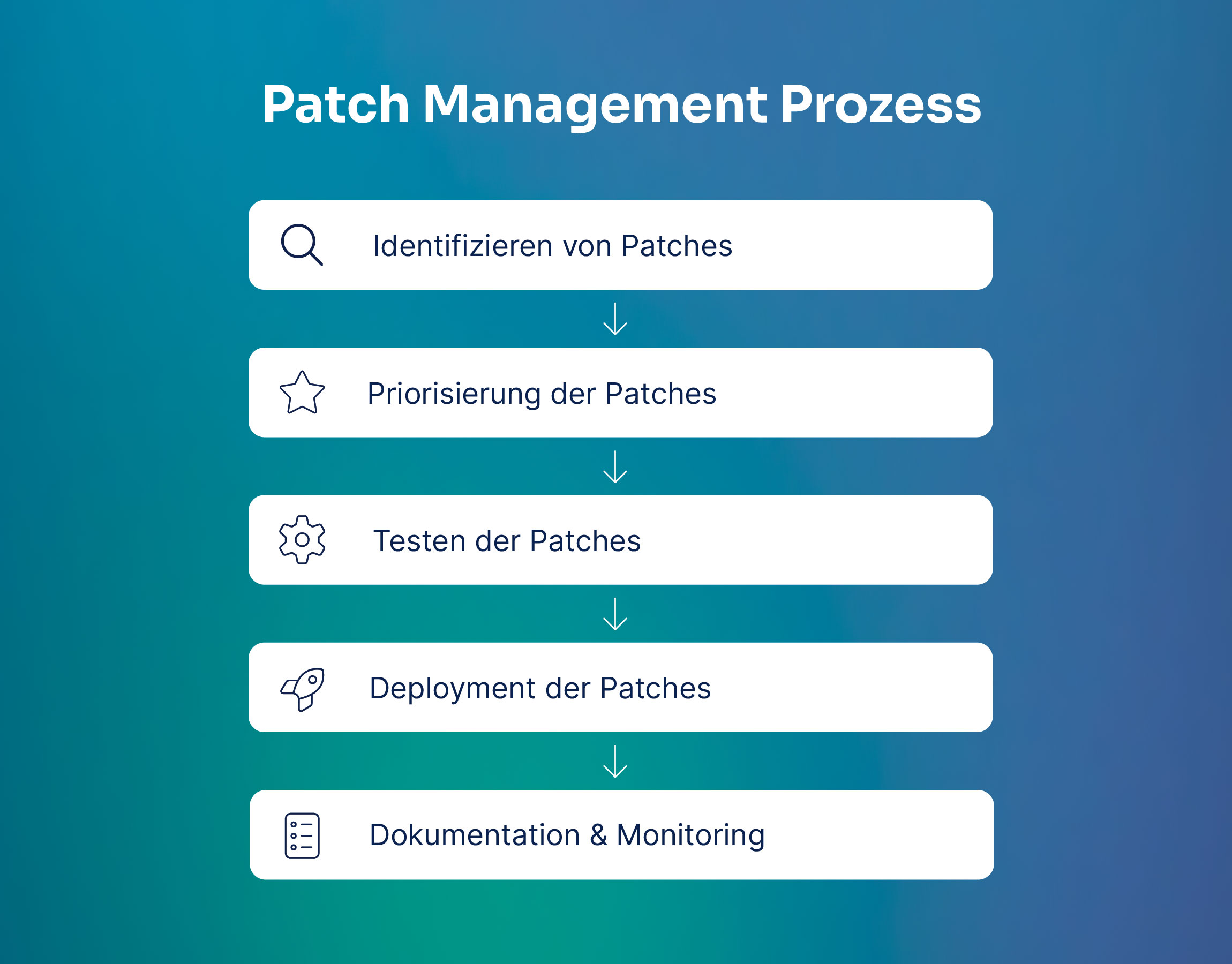
The 5 phases of patch management
A structured patch management process ensures that all systems remain secure and stable. Without a clear methodology, critical patches are overlooked or cause unexpected issues. When done manually, this process is extremely time consuming. With automation, however, it can be drastically simplified.
- Identification: Detecting available patches for operating systems, applications, and third party software. Modern tools automatically scan all devices and compare them with patch databases. Example: A critical Windows security patch is released – your system detects it immediately and flags the affected devices.
- Assessment: Prioritizing patches based on criticality and risk. Security patches for known vulnerabilities have the highest priority, while feature updates can wait. Example: A patch for an actively exploited vulnerability is classified as critical and scheduled immediately.
- Testing: Compatibility checks in pilot groups before patches are rolled out company wide. This allows you to identify potential conflicts early. Example: The patch is first installed on three test devices and monitored for 24 hours.
- Deployment: Staged distribution of patches to all endpoints – first the test group, then a gradual rollout. Automated systems handle installation outside of working hours. Example: Patches are installed overnight so employees can start the day with up to date systems.
- Documentation: Complete documentation of all patching activities for compliance purposes. Which device received which patch, and when?
Automated vs. manual patch management – the difference
The difference between manual and automated patch management is significant – especially for companies without a dedicated IT department. While manual processes are time intensive, error prone, and not scalable, automation enables consistent, fast, and reliable patch distribution across all devices.
Especially for companies without an IT department, automation is not optional, but essential. Modern platforms like deeploi provide automated patch management – without requiring IT expertise or manual processes.
The right patch management solution for companies without an IT department
Selection criteria for patch management tools
Choosing the right patch management solution determines whether your IT security becomes a competitive advantage or a burden. Especially for accidental IT owners, meaning people who manage IT alongside their actual role, certain criteria are critical.
- Cross platform support: The solution should cover all operating systems used in your company – Windows, macOS, and mobile devices such as iOS. This is the only way to avoid isolated solutions and maintain full visibility of all assets within one central platform.
- Automation and orchestration: Autonomous patch distribution without manual intervention is essential. The solution should automatically identify, prioritize, and install patches. Intelligent scheduling ensures updates are installed outside working hours so productivity is not affected.
- Usability for non IT experts: An intuitive user interface with clear dashboards gives you a complete overview of patch status across all systems, without requiring technical expertise. Color coded status indicators, easy to understand notifications, and simple workflows are essential.
- Support and proactive expertise: Fast response times and proactive guidance make the difference. You need a partner who does more than provide software, someone who actively supports you and anticipates issues before they arise.
deeploi meets all of these criteria and goes one step further. As an all in one solution, we combine a modern platform with human support. In practical terms, this means automated patch distribution across all your devices, centralized management through an intuitive dashboard, and an experienced support team that responds in an average of 12 minutes, significantly faster than our SLA of 30 minutes. You focus on your core business, we take care of your IT security.
Best practices: how to implement effective patch management
Structured patch management is only as good as the processes behind it. These seven best practices help you systematically close security gaps, meet compliance requirements, and make optimal use of your IT resources.
- Define clear patch policies: Specify which patches are installed and when. Categorize them by criticality, such as critical security patches, important updates, and optional features, and define maintenance windows for different systems. This ensures business critical patches are prioritized while less urgent updates are rolled out in a planned manner.
- Create full transparency: Complete asset inventory is the foundation of effective patch management. You must always know which devices, software, and operating systems are in use in your company. A real time overview of patch status across all assets prevents systems from being overlooked and turning into security risks.
- Prioritize by risk and impact: Not all patches are equally important. Critical security patches that close actively exploited vulnerabilities have top priority. Assess patches based on threat level, affected systems, and potential impact on your business.
- Test before production rollout: Install new patches on pilot groups first to identify compatibility issues early. Define a clear rollback strategy in case a patch causes unexpected problems. This minimizes the risk of system outages in production environments.
- Automate standardized processes: Routine patches for operating systems and commonly used applications should be distributed automatically. Retain manual control only for critical systems or complex applications. Automation significantly reduces human error and accelerates patch distribution.
- Document consistently and completely: Document which device received which patch and when, who approved the patching process, and whether it was successful.
- Review and optimize regularly: Create monthly reports on patch status, compliance rates, and any issues encountered. Analyze weaknesses in your process and continuously improve. Regular reviews ensure your patch management keeps pace with the growing demands of your company.
The process is fairly complex. The good news is that with the right patch management solution, these best practices are implemented automatically. Modern platforms support all seven points natively, from automatic asset inventory and intelligent prioritization to complete documentation. This allows you to benefit from professional vulnerability management without having to be an IT expert yourself.
Common patch management mistakes and how to avoid them
Even with the best intentions, the same mistakes keep happening in patch management, often with serious consequences for security and compliance. The good news: all of these issues can be avoided with the right strategy and modern tools.
deeploi systematically eliminates these risks through intelligent automation and centralized management. Our platform automatically prioritizes patches based on criticality, captures all endpoints without gaps, performs software updates, and documents every updated device. The result: your IT remains secure, stable, and compliant, without you having to worry about the details.
Conclusion: automated patch management for greater efficiency and security
Patch management is not a technical detail, but business critical for cybersecurity and compliance. Manual patching processes are not scalable, time intensive, and error prone, especially for companies without a dedicated IT department. Automation is not optional here, but essential. It saves time, minimizes human error, and ensures that no device is overlooked.
The right solution makes the decisive difference between reactive crisis management and proactive protection. For companies without an IT department, deeploi is an ideal choice. Our all in one platform automates the entire patch management process and provides centralized management of all endpoints. We combine intelligent software with human support – you benefit from automated patch distribution and an experienced team that responds in an average of 12 minutes. Of course, we are also happy to support companies that already have an IT department.
Concrete benefits for your daily work: IT onboarding in 3–5 minutes instead of 2–3 hours, no IT expertise required, transparent visibility into the patch status of all devices, and proactive protection against security threats. Focus on your core business – we take care of your IT security.
Ready for automated patch management? Book a demo with our team now.
FAQ – frequently asked questions about patch management
What is patch management and why is it important?
Patch management is the systematic process of identifying, evaluating, and installing software updates and security patches across all devices in your company. It is essential for IT security because unpatched systems are the biggest entry point for cyberattacks. Patches close security vulnerabilities in operating systems and applications before attackers can exploit them.
How does automation improve IT security in patch management?
Automated patch management responds significantly faster to threats than manual processes – critical security patches are deployed within hours instead of days. No device is overlooked, as all endpoints are centrally recorded and patched automatically. Consistent application based on defined policies eliminates human error and ensures that all systems meet the same security standard. This significantly reduces your risk of cyberattacks.
How does the patch management process work in SMEs?
The process runs through five phases:
- Identification of available patches
- Assessment based on criticality
- Testing in pilot groups
- Staged deployment
- Complete documentation
For SMEs without an IT department, automation is crucial. Modern tools handle all steps independently, from scanning systems and prioritizing patches to installing them overnight. You retain control through a central dashboard without having to deal with technical details.
Which patch management software is suitable for companies without an IT department?
Look for cross platform support such as Windows and macOS, smart automation, integration with existing systems, and intuitive usability for non IT experts. deeploi meets all of these criteria. Our all in one platform automatically distributes patches to all devices, integrates seamlessly with Personio and other HR tools, and combines intelligent software with human support. With an average response time of 12 minutes, deeploi resolves issues quickly – without requiring IT expertise from you.